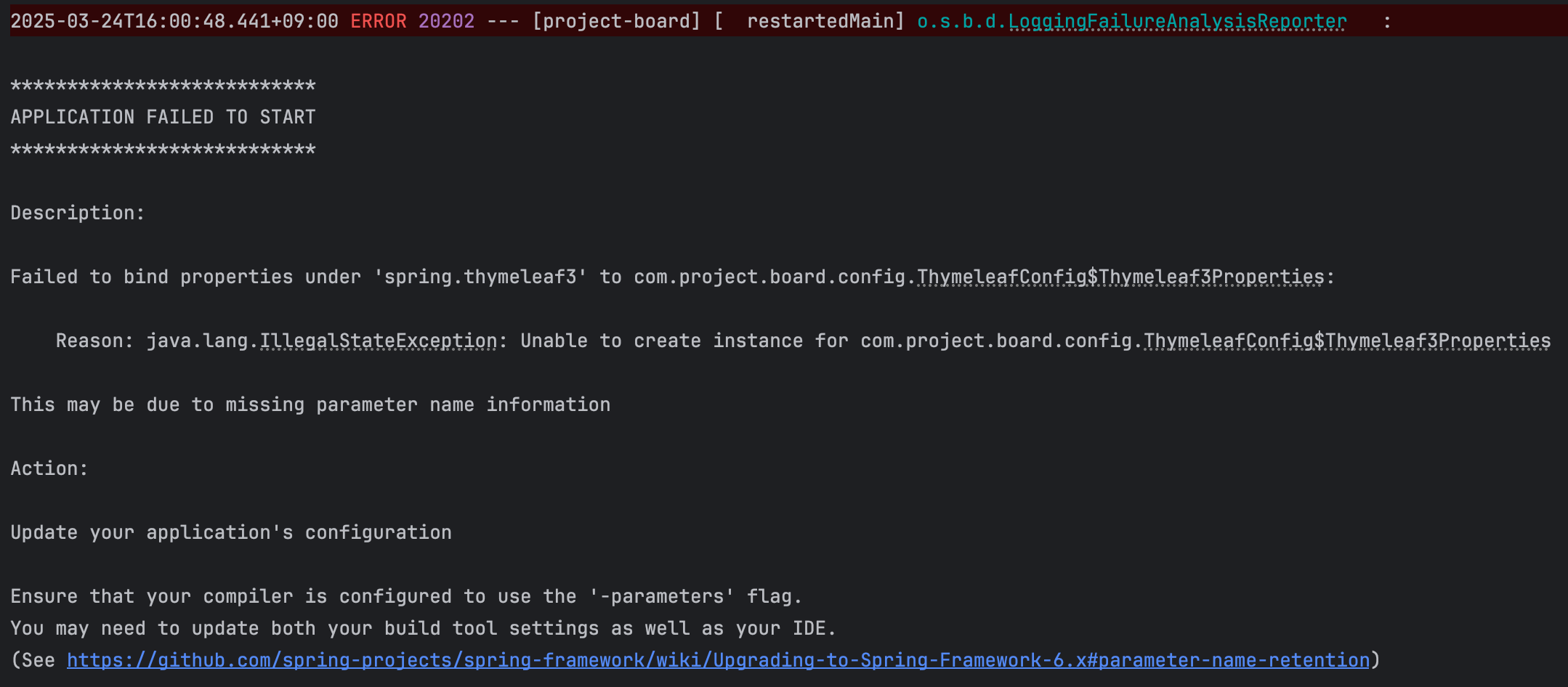
Error : Ensure that your compiler is configured to use the '-parameters' flag.
You may need to update both your build tool settings as well as your IDE.
Action 부분을 살펴보면,
Update your application's configuration.
Ensure that your compiler is configured to use the '-parameters' flag.
You may need to update both your build tool settings as well as your IDE.
애플리케이션 구성 업데이트로,
컴파일러가 '-매개변수' 플래그를 사용하도록 구성되어 있는지 확인하고,
빌드 도구 설정과 IDE를 모두 업데이트해야 한다고 한다.
‘-parameters’ 플래그는 Java 컴파일러에서 메서드 파라미터 이름을 바이트코드에 포함시키는 옵션이다.
이 옵션을 활성화하면 리플렉션을 사용하여 메서드의 파라미터 이름을 확인할 수 있게 된다.
컴퍼일러가 -parameters 플래그를 사용하도록 설정하는 방법은 두 가지 주요 부분에서 확인할 수 있는데,
빌드 도구 설정과 IDE 설정이다.
컴파일 속도를 높이기 위해 gradle 대신 intellij로 컴파일 및 테스트 코드를 실행했는데,
둘다 inteillij로 설정 후 실행 할 경우 이와 같은 에러가 발생했다.
먼저 IDE 설정(intellij IDEA)
Gradle을 이용하여 빌드하고 실행. (주의! 스프링 부트 3.2 부터 Gradle 옵션을 선택)
스프링 부트 3.2 부터 앞에 Build and run using에 앞서 설명한 intellij IDEA를 선택하면 몇 가지 오류가 발생.
따라서 스프링 부트 3.2를 사용한다면 다음과 같이 intellij IDEA가 아니라 Gradle을 선택한다.
Intellij IDEA > Settings > Build, Execution, deployment > Build Tools > Build and run using > Gradle 선택
Build and run usig을 intellij 가 아닌 gradle 선택.

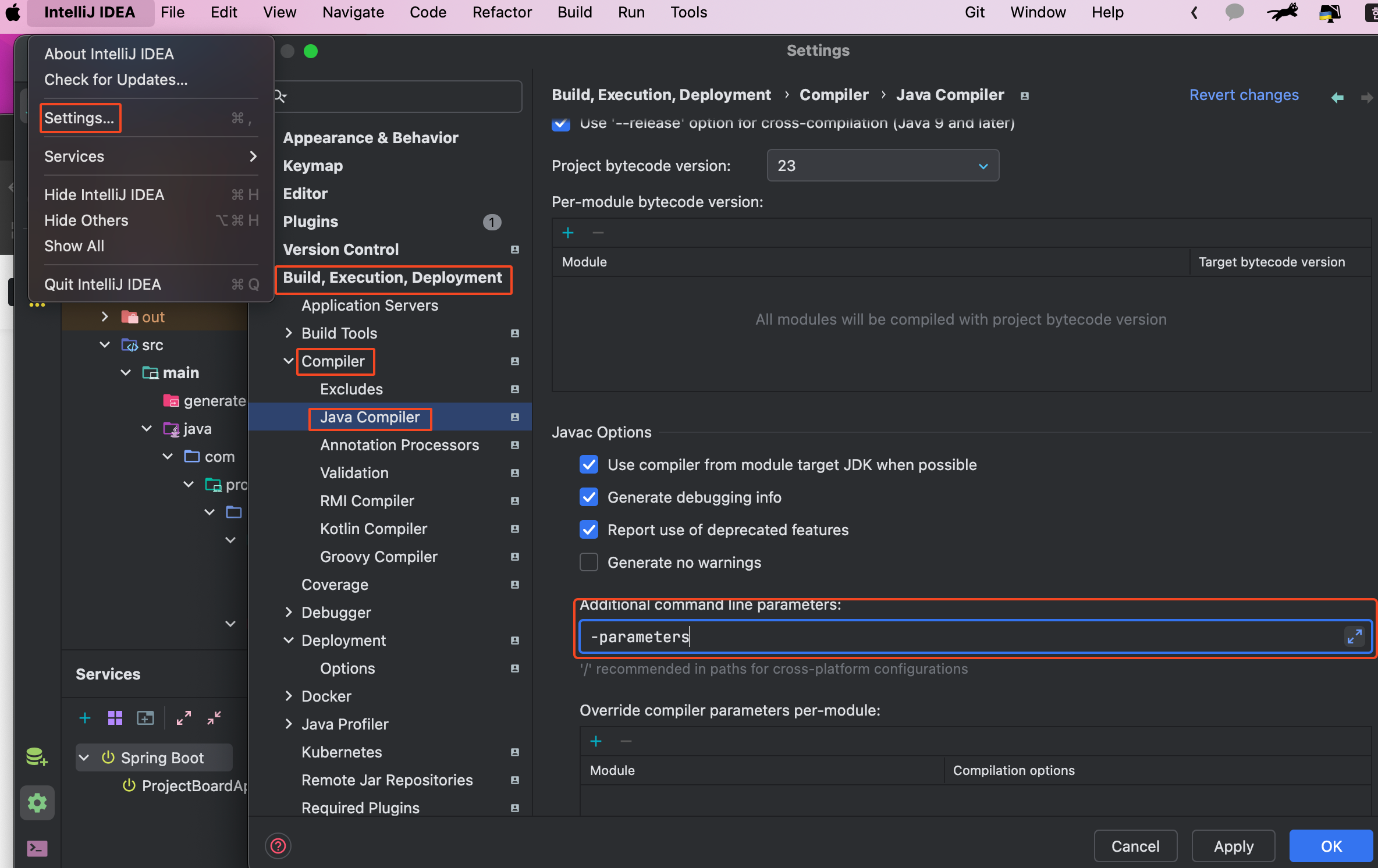
컴파일 시점에 -parameters 옵션 적용
Intellij IDEA > Settings > Build, Execution, Deployment > Comprile > Java Compiler > Additional command line parameters에 `-parameters`를 추가한다.
* 꼭 out 폴더 삭제 후 재 실행.
그 외 빌드 도구 설정으로는,
-parameters 플래그를 사용하도록 Gradle을 설정하려면,
build.gradle 파일에서 JavaCompile 작업에 대해 컴파일러 인수를 추가해야 한다.
Gradle : build.gradle 파일에 다음과 같은 설정을 추가.
groovy복사
tasks.withType(JavaCompile) {
    options.compilerArgs << "-parameters"
}
이렇게 설정을 완료하면 메서드 파라미터 이름을 바이트코드에 포함시킬 수 있게 되며, 리플렉션을 통해 해당 정보를 사용할 수 있다.
Upgrading to Spring Framework 6.x
Spring Framework. Contribute to spring-projects/spring-framework development by creating an account on GitHub.
github.com